


MSN
4.515.04K Reviews
App Specs
- Version
- Varies with Device
- Updated On
- License
- Free
- Downloads
- 10,000,000+
- Developer
- Microsoft Corporation
- Categories
- News & Magazines
- Platform
- Android, iOS
Screenshots




 Analysis by AppCompare
I like a news app best when it helps me get oriented quickly, then lets me decide what deserves more time. That is the role MSN aims to fill: a mobile reading hub for headlines and other everyday information, rather than a single publication with one editorial voice. In my experience, that distinction matters. It is useful when I want a broad scan of the day, but I still need to think about which stories and sources I want to follow closely.
A broad news dashboard for everyday reading
MSN is a free news and magazines app from Microsoft Corporation. It is rated for Everyone 10+ and has an average rating of 4.5 from around 301,000 ratings, with more than 10 million installs. Those figures suggest it has reached a large audience, but they do not tell me whether its mix of coverage will suit a particular reader. The practical question is whether a personalized feed makes it easier to keep up without turning a quick check into an endless scroll.
The app’s central appeal is its breadth. Rather than asking me to open several publishers just to see what is happening, it brings together a tailored feed and sections for subjects such as news, weather, sports, and finance. That makes it a handy starting point when I have a spare moment and want both headlines and a little context about the day ahead. I would treat it as a convenient front door to coverage, not as a replacement for reading a trusted publication in depth.
What has changed—and what I can actually judge
MSN has been available since December 11, 2014, and it requires iOS 11 or later. That long history places it among established mobile news options, but a release date by itself does not tell me which individual features have changed over time. I can judge the current experience by what it offers: a personalized news feed alongside practical sections, all under Microsoft’s name. I would be cautious about reading a particular design choice as proof of a recent update or a promised direction.
For someone who has used MSN before, the most useful way to assess it is to check whether the feed still matches their interests and whether the sections they rely on are easy to reach. Personalization can make the app feel more relevant, but it is also something users may need to revisit as their interests change. If I start seeing too much of one subject, I would adjust what I follow rather than assume the whole service has become less useful.
How I would use the feed and its extra sections
The tailored feed is most useful when I treat it as a flexible briefing, not a complete picture of the world. I can focus it around subjects I care about, then open related coverage when a headline deserves a closer look. Because MSN gathers material from different sources, I would check the publisher and read the article itself before treating a short headline or summary as enough context for a complicated issue. That small habit helps me use an aggregator without confusing a convenient collection with one unified newsroom.
The extra sections make the app more practical between reading sessions. Weather can help me think through what to wear or whether to plan around changing conditions; sports coverage gives fans a place to check scores and schedules; and financial updates can provide a quick market glance. I would use those as quick reference points, then switch to a specialist source when I need more detail. The benefit is fewer app changes for casual checks, while the trade-off is that a general-purpose app may not satisfy someone who wants depth in only one of those areas.
Worth Reading Before You Choose

Baby Panda World Brings Quick Play to Modern Phones, but Its Game Library Feels Busy

ESPN’s Live Game View Makes Following Close Games Easier

QuizzLand Review: A Good Fit for Short Trivia Breaks, Not Every Player

Basketball Stars: Multiplayer Is Fast, but Can It Recover When Matches Go Wrong?

WEBTOON Turns Phone Updates Into a Better Reading Routine

Link to Windows Runs on Shared Habits, Not Social Feeds
Where it fits—and where I would choose something else
Compared with a newspaper’s own app, MSN is better suited to browsing across topics and sources than following one publication’s reporting, presentation, and editorial priorities. Compared with a simple headline reader, its weather, sports, and finance sections give it a wider everyday role. But readers who want a consistent point of view, a deep archive from one outlet, or a carefully curated specialist feed may be happier with a publication-specific or topic-focused app. I see MSN as a useful companion to those choices, not necessarily a substitute.
A realistic routine might be to open the feed over breakfast, scan a few headlines, check the forecast before leaving, and look at a team’s schedule later in the day. That is where the app’s range can save time: I do not need to decide in advance that I am opening it only for one subject. To keep that routine focused, I would choose a small set of interests and make a point of leaving the feed once I have found what I came for. A personalized stream can be convenient, but it can also encourage one more scroll when I meant to check only the weather.
I would especially recommend MSN to readers who want a free, broad overview and enjoy moving between general news and practical daily information. It is also a reasonable option for someone who has not settled on one preferred news source and wants to compare coverage before following a story elsewhere. On the other hand, it may not be the right fit if you dislike aggregated feeds, prefer to avoid a mix of publishers, or want a dedicated specialist experience for weather, markets, or sports.
First Impressions
When I first downloaded the MSN app, I was immediately struck by its clean and straightforward design. It's like the app itself is saying, “Hey, I’m here to give you the news, no frills attached.” The layout is intuitive, with a navigation bar that makes it easy to switch between sections like news, weather, sports, and more.
One of the standout features is the customization option. You can tailor the app to focus on topics and sources that interest you the most. Whether you're into technology, politics, or lifestyle, MSN has you covered. It's like having a personal news assistant who knows exactly what you’re into.
Content Quality
Now, let’s talk about content. The app aggregates news from a wide variety of sources, ensuring a well-rounded perspective on current events. From major headlines to niche stories, there's a little something for everyone. The articles are well-written, and you can easily dive deeper into a topic with related stories and videos.
What really impressed me was the app's commitment to factual reporting. In a world where misinformation can spread like wildfire, having a reliable source of news is refreshing. It’s like the app is your trusty companion, always presenting information with integrity.
Additional Features
Beyond news, MSN offers a plethora of additional features that make it more than just a news app. For instance, the weather section is incredibly detailed, providing everything from current conditions to hourly forecasts. It's perfect for planning your day or week without needing a separate weather app.
Sports fans will appreciate the dedicated sports section, which covers a wide range of sports and leagues. You can find scores, schedules, and even live updates, making it easy to keep up with your favorite teams.
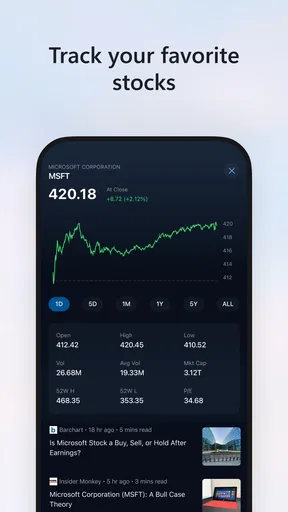
Another cool feature is the integration of financial news and stock market updates. It’s handy for those who like to keep an eye on the market trends without switching between multiple apps.
User Experience
The user experience is top-notch, thanks to the app's responsive design and smooth performance. Articles load quickly, and the app rarely crashes or experiences glitches. It's like the app is saying, "I’ve got your back, no matter how fast you scroll."
The app also supports offline reading, which is a game-changer for commuters or anyone who has intermittent internet access. Just save articles to read later, and you’re good to go.
What to keep in mind as you use it
For a better reading routine, I would separate quick checks from deeper reading. I might scan the feed while waiting for a train, save a story that needs attention for later, and return to it when I have enough time to follow its links and context. That approach makes a mixed-source feed more useful: a headline is a pointer, while the article and its publisher provide the substance. It also keeps the app from becoming a substitute for checking a primary source when accuracy or detail matters.
One practical trade-off with personalization is that relevance and variety can pull in different directions. Following familiar subjects makes the feed feel immediately useful, but leaving room for topics outside my usual interests can help me avoid seeing only one slice of the news. I would revisit my selected interests now and then, especially after a major event or a change in what I care about. The goal is not to make the feed perfect; it is to make it a better starting point without treating its selection as comprehensive.
For offline reading, I would prepare before losing connectivity rather than assume the whole feed will be available without a connection. Saving a few specific articles while online is a more dependable commuter habit than opening the app underground and expecting new coverage to load. That small distinction matters if offline access is a key reason for choosing it: it is most useful as a way to revisit material already saved, not as a way to keep receiving fresh updates everywhere.
Another useful habit is to choose the right tool for the depth of the task. MSN can answer “What is happening?” or “How did the game finish?” quickly, while a detailed market decision, a complex political story, or a local forecast may call for a specialist source. I would use the app to spot what deserves attention, then move to a source with the right expertise when the stakes or the detail increase. Its broad scope is a convenience, not a guarantee that every section will be as deep as a dedicated service.
Who will get the most from it
I think it is a strong fit for someone who likes a single place to browse several kinds of information and does not mind seeing articles from different publishers. It can also help a casual reader who wants to build a daily news habit without committing to one outlet immediately. If you already know which newsroom you trust and read it closely every day, its own app may provide a more consistent experience. If your priority is only detailed forecasts, live scores, or investment research, a dedicated app is likely the more focused choice.
Before settling into a routine, I would spend a few minutes adjusting the subjects and sources that shape the feed, then check whether the results feel balanced after a few visits. I would also decide what I want the app to do: quick briefing, a place to revisit saved reading, or a convenient way to check several sections. Having that purpose in mind makes it easier to tell whether the feed is helping or simply adding another stream of notifications and headlines to manage.
Final Thoughts
So, is the MSN app worth a spot on your home screen? Absolutely! It's a well-rounded, reliable source of information that caters to a wide range of interests. Whether you're checking the latest headlines, planning your day around the weather, or catching up on sports scores, this app does it all with ease.
In a nutshell, the MSN app is like a Swiss Army knife for news and information. It's versatile, reliable, and incredibly user-friendly. So if you're looking for a comprehensive app to keep you informed and entertained, give MSN a try. You might just find it becomes your go-to app for all things news.
Pros
- User-friendly interface enhances navigation.
- Real-time news updates keep you informed.
- Customizable news feed for personalized content.
- Integrates seamlessly with other Microsoft services.
- Available in multiple languages for global users.
Cons
- Occasional ads can interrupt the experience.
- Requires internet connection for updates.
- Limited offline content access.
- Personalization options can be overwhelming.
- Some features locked behind Microsoft account.
FAQs for MSN
What features does the MSN app offer for news consumption?
The MSN app provides a comprehensive news experience, offering users access to a wide range of topics such as world news, entertainment, sports, and lifestyle. It aggregates content from various reputable sources, allowing for personalized news feeds. Additionally, users can customize their reading preferences and receive breaking news alerts.
Is the MSN app free to download and use on Android and iOS devices?
Yes, the MSN app is free to download and use on both Android and iOS devices. There may be occasional ads within the app, but these do not require any payment to view content. The app focuses on providing a seamless and cost-effective news browsing experience.
How can I personalize my news feed on the MSN app?
Personalizing your news feed on the MSN app is straightforward. Upon setting up the app, you can choose your areas of interest, such as politics, technology, or sports. Users can also follow specific news sources and adjust settings over time to refine the content that appears on their feed, ensuring a tailored experience.
Does the MSN app require an internet connection to function?
Yes, the MSN app requires an internet connection to access the latest news and updates. While some content may be saved for offline reading, the app's primary function is to deliver real-time news, which necessitates a stable internet connection, either through Wi-Fi or mobile data.
How does the MSN app handle user privacy and data?
The MSN app is committed to user privacy, adhering to Microsoft's stringent privacy policies. It collects data to improve user experience, but users have control over their privacy settings. The app allows users to manage data collection preferences, ensuring transparency and control over personal information.


